
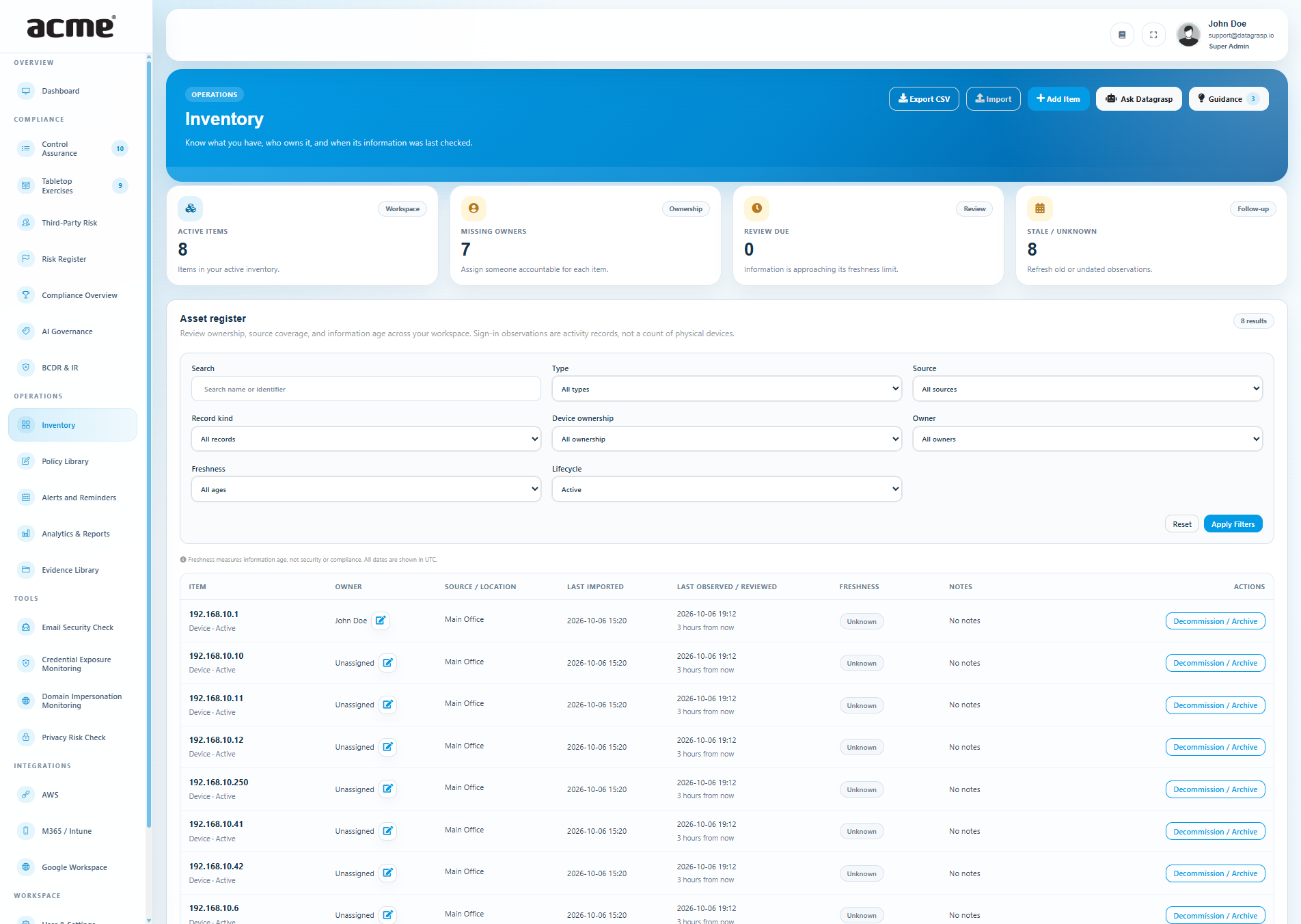
An asset list becomes useful when your team can answer three questions: what do we have, who is accountable for it, and how recent is the information?
Datagrasp Inventory brings those answers into your compliance workspace. Open Operations → Inventory to combine connected sources with manual records and imported reports. Then use the register to support matching Control Assurance requirements with a dated evidence snapshot and a generated note.
Start with the records you already have
You can begin with a handful of manual entries or bring over an existing spreadsheet using the CSV template. Preview the proposed additions and updates before confirming an import. A fictional example file shows the expected format.
For local discovery, import an Nmap XML report generated on your own authorized network. Datagrasp reviews the report; it does not run a network scan. The step-by-step guide includes the command and explains how to review hosts identified only by an IP address.
Combine your cloud and endpoint sources
A workspace can use Google Workspace, Microsoft 365 / Intune, and AWS together, alongside CSV, Nmap, and manual records. Enable the feeds you need under Inventory → Sources after validating each integration.
- Google Workspace: managed ChromeOS devices, company and personal Cloud Identity endpoints, and optional successful login observations.
- Microsoft 365 / Intune: company and personal Intune devices, Entra registered devices that do not require Intune enrollment, and optional successful sign-in observations.
- AWS: EC2 instances and RDS databases in the configured region, plus S3 buckets across the connected account.
Each source keeps its own collection history and coverage. Enabled sources collect daily, and Sync Now requests another collection. Permissions, licensing, and provider availability determine which feeds can return data. Cross-provider records remain separate for review.
Make personal devices visible without guessing
Where the provider reports personal ownership, devices are labeled BYOD / Personal. Other records show company ownership or unknown ownership. An unmanaged device is not automatically classified as personal.
Optional sign-in observations help teams see account activity from devices outside their managed fleet. These are activity records, not a verified count of unique physical devices. Use the record-kind and ownership filters to review them separately; sign-in observations are excluded from inventory control-evidence snapshots.
Put accountability and information age beside each record
Assign an accountable owner and add notes directly from the register using the pencil icon beside the owner. Capture context such as a device's purpose, location, or a follow-up task. Cloud discovery preserves these owner assignments and notes.
Separate timestamps show when information was imported and when the asset was last observed or reviewed. Freshness labels distinguish current information, review due, stale information, and unknown dates.
Freshness measures information age. It is not a security rating or a compliance result. Re-uploading an old report or editing a note does not make the underlying observation recent.
Bring the inventory into Control Assurance
For a matching inventory requirement, the control row shows relevant active records and age warnings. Choose Use inventory evidence, review the scope, and confirm Attach Snapshot & Add Note.
Datagrasp saves a CSV and a readable coverage summary in the control's evidence folder, then appends a dated note. The snapshot preserves original observation dates, accountable owners, missing information, and source limitations. Existing notes and the assessor's control status stay intact.
Connections can use an explicit scope maintained in the control library or a suggestion based on requirement wording. A hardware control needs device records; a software inventory control needs application records. Device discovery alone cannot establish a complete software inventory.
The snapshot records what was available at capture time. When the register changes, review the requirement and capture a new snapshot. Your team still decides whether the evidence covers the requirement and whether the control is complete.
Get help in the workspace
Guidance surfaces missing owners, aging information, and source-coverage gaps. Ask Datagrasp can explain the inventory or the item you are viewing using your current workspace context. The assistant is read-only.
Super Admins and Compliance Administrators maintain records. Auditors can read and export them. Provider operators work within the selected managed client's inventory.
A practical next step beyond a spreadsheet
Inventory is a lightweight register for day-to-day compliance work. It gives teams a place to maintain asset context and bring that work into an evidence review. Agent deployment, software license management, automatic cross-provider merging, and asset-to-risk or recovery dependency mapping are outside its current scope.
Start with one source, assign owners, review information age, and attach your first inventory snapshot to a matching control.
Read the Inventory guide, open Inventory in your workspace, or contact Datagrasp to get started.